从iTunes 9不是64bit Cocoa说起
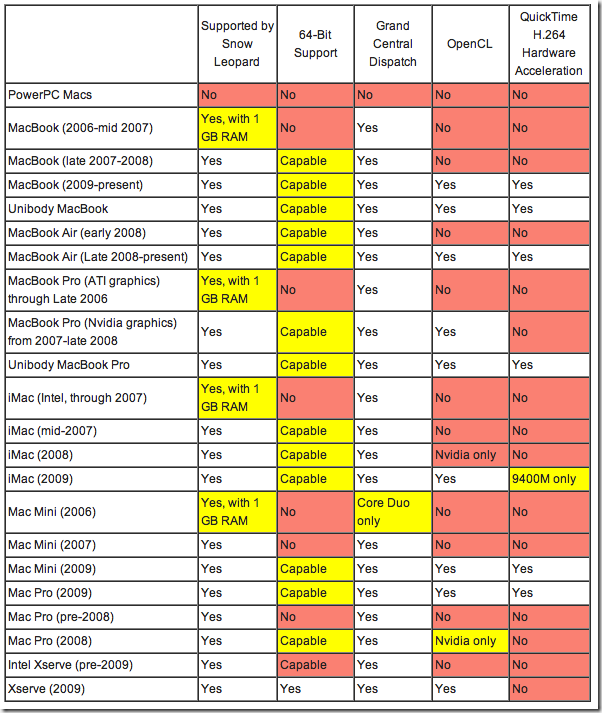
短期内iTunes不会有64bit的,目前iTunes的Windows版本和Mac版本,维护着大量的公用库和跨平台底层。这些东西,其实在iTunes 中保持着相对的稳定。整个iTunes框架而言,需要照顾的不仅仅是Windows和Mac OS,还有各个型号的iPod。Apple必须保证其iTunes程序能提供两个电脑系统的平台上,各自顺利同步众多型号的iPod、Apple TV、iPhone等等。在这个时候重写iTunes的底层是吃力不讨好的。看看目前世界经济环境,在有限的研发投资下面,Apple选择的将一定是加快设备开发的投入,抢占市场。而软件,Apple会鼓励使用新的Cocoa技术,但是不是一切非要Cocoa不可。 回想一下,Carbon Finder也伴随我们走过了那么久,想象iTunes也一样。但是,The future is 64bit,未来是64位的,无论Windows或者Mac都一样。所以iTunes甚至iPhone OS都必须是64bit的。只是时机还没有到。不过也快了。我预感,不远了。 Apple是善于抛弃包袱的公司,Windows 7到目前还能很好地运行部分DOS 16bit应用,Power Shell也因此没有代替经典的命令行模式。而Apple则不同,数年前的Classic环境已经不被支持了,Rosetta也渐渐淡去了。Apple抛弃旧有技术的决心,是一种鞭策,鞭策着必须要有新的,完善的解决方案,而新方案不单单是解决旧有的问题,而是正恰恰是使用当前的主流硬件的极限性能,出色地完成新架构应该完成的任务,同时在这个基础上,做出超越。所以Mac总是在性能和功能之间显得很平衡。然而这种决断,正是Microsoft所缺乏的,如果不然,Windows 7会比现在快很多倍。 这也正使得Apple的Mac OS X显得很有活力,通过不断的“无情”的进化,在痛苦的蜕变后不断获得新生,而Windows在不断的兼容性维持中,付出了惨痛的代价以致于性能和功能的平衡严重失衡,Vista就是一个典型的教训。对用户来说,Classic和Snow Leopard已经革命性地彻底改变,然而Windows 7呢,去掉Areo后,和Windows 98还有太多太多的相似。 // PS: 上文是我在Google Reader中对下文发表的评论: iTunes and Cocoa 原文:http://daringfireball.net/2009/09/itunes_and_cocoa 译文:http://apple4.us/2009/09/itunes-cocoa.html(由于Apple4us的CC协议限制,这里就不贴出译文了) 原文引用: iTunes and Cocoa Friday, 11 September 2009 John Nack posted a good devil’s advocate piece regarding whether and why iTunes should ever go 64-bit. Nack asks: Do people really have performance problems* with iTunes as it is? I never have. It filters my 3,000-item library as fast as I can type, does a lovely job with HD video, and whips through album art in Cover Flow. I can’t recall others complaining, either. Do they want iTunes to use more than 4GB of RAM? I think we can safely say “No.” Do they complain about the UI (e.g. non-standard scrollbars) and think that Cocoa will make iTunes more “Mac- like”? Again, I haven’t heard complaints (or rather, only ridiculous ones). So what, then? Let me put it another way: If you were directing the iTunes team’s efforts, why would you — as a customer — tell them to spend their time on Cocoa and/or 64-bit, at the expense of doing other things customers want? I, of all people, have certainly never been one to argue for Carbon-to-Cocoa rewrites just for the sake of Cocoa being better just because it’s Cocoa. And the same goes for 64-bit-ness. What really matters are features and user experience, not the developer technologies used to make them. When I say it seems inevitable that Apple will eventually move iTunes to Cocoa and 64-bit, it’s not because those two things in and of themselves will dramatically improve the features and experience of the software. I say it seems inevitable because Apple has moved almost all of their “system apps” to 64-bit. Check out the first footnote on Apple’s Snow Leopard Technology page: All system applications except DVD Player, Front Row, Grapher, and iTunes have been rewritten in 64-bit. Almost everything else that ships with Mac OS X is 64-bit now.1 Were customers demanding a 64-bit Dock? Has anyone’s life been changed now that the Dictionary app is 64-bit? Of course not. For some apps there really have been tangible performance improvements in the move to 64-bit, but the reason Apple has moved almost all their apps to 64-bit is simply because it’s now what they consider the best way to build Mac software. They are leading by example, preparing for the future. The Finder is the best example to compare against iTunes. The Snow Leopard Finder didn’t just have to be ported from 32-bit to 64, it had to be ported from Carbon to Cocoa. In the early years of Mac OS X the Finder was the app Apple held up at WWDC as its Carbon “dog food” example — proof that it was using the Carbon APIs for an essential app. It was the Carbon poster child. No matter how modern a Carbon app the Finder was (insofar as that it was written specifically for the then-new Carbon APIs on Mac OS X, not a port of old classic Mac OS code), it must have been a lot of engineering work to port it to Cocoa — with the result being an app that most users won’t notice being any different at all from the Carbon Finder in 10.5. John Siracusa described the new Snow Leopard Finder thus: The conversion to Cocoa followed the Snow Leopard formula: no new features! except for maybe one or two. And so, the “new” Cocoa Finder looks and works almost exactly like the old Carbon Finder. The biggest indicator of its “Cocoa-ness” is the extensive use of Core Animation transitions. Sven-S. Porst was a bit harsher: In short, people probably put a lot of effort into creating a Finder that sucks just as much as the old one but which can tag itself with the labels ‘64bit’ and ‘Cocoa’. Cocoa was not magic pixie dust that inherently made the Finder radically better. But so why did Apple bother? Because Cocoa and 64-bit are the future of Mac OS X. And, for many new APIs, they are the present. As Siracusa noted in the 64-bit section of his Snow Leopard review: The second big carrot (or stick, depending on how you look at it) is the continued lack of 32-bit support for new APIs and technologies. Leopard started the trend, leaving deprecated APIs behind and only porting the new ones to 64-bit. The improved Objective-C 2.0 runtime introduced in Leopard was also 64-bit-only. Snow Leopard continues along similar lines. The Objective-C 2.1 runtime’s non-fragile instance variables, exception model unified with C++, and faster vtable dispatch remain available only to 64-bit applications. But the most significant new 64-bit-only API is QuickTime X. In short, there are new APIs and features in Mac OS X which are only available to 64-bit apps, and because there are no 64-bit Carbon APIs, 64-bit apps implicitly means 64-bit Cocoa apps. Carbon has not been deprecated. There have been no warnings that the existing Carbon APIs will be going away in a future version of Mac OS X. Some of the biggest and most popular third-party apps, like Microsoft Office and the Adobe CS suite, are Carbon. Even if the next major releases of these apps are all ported to Cocoa, there are an awful lot of Mac users who are going to want to keep using the versions they’ve already bought. And, even if you’re not persuaded by Apple’s motivation to support third-party Carbon developers, note that nearly all of Apple’s own “Pro Apps”, lik e those in Final Cut Studio, remain Carbon apps. Maybe the Carbon APIs will never go away, but I wouldn’t bet on that. They’re certainly not going away soon, but never is a long time. And Apple’s new stuff is all 64-bit. The writing has been on the wall ever since the planned-for 64-bit Carbon was unceremoniously canned at WWDC 2007. The Classic Mac OS environment went away after just a few years. Rosetta (the PowerPC emulator) is no longer installed by default with Snow Leopard, and my guess is that it won’t be included at all in 10.7. Apple doesn’t just add things to Mac OS X — they remove old things. Carbon hasn’t been deprecated but Apple clearly considers it legacy technology, and Apple has demonstrated a strong institutional aversion to legacy anything. The single most remarkable thing about Snow Leopard is that it is smaller than the previous version of the system. It is an operating system that is — and, going back to its roots at NeXT, has always been — evolving, not just growing. Apple doesn’t just add to it. They prune. They churn. And the track record shows that when it comes to ushering old technology out the back door, they err on the side of too soon rather than risk letting it linger too long. Apple worries about the way things should be far more than it worries about continuity with the way things used to be. The Cocoa Advantage for Users A 64-bit Cocoa version of iTunes isn’t going to sync with your iPod faster just because of 64-bit Cocoa magic. But the new Snow Leopard Finder does show the subtle ways that a Cocoa rewrite has tangible advantages for users. System-wide services work in both Carbon and Cocoa apps via the Services menu, but only Cocoa apps pick up the new-to-Snow-Leopard contextually-aware services in contextual menus. This is something Apple added to Cocoa, so all Cocoa apps get it “free”, including the new Finder. iTunes 9, because it’s Carbon, does not. Another example. Long-time DF readers may remember “Highly Selective”, a piece I wrote three years ago regarding the two UI models for selecting multiple items in a list using the keyboard: anchored and unanchored. I argued (successfully, it turns out) in favor of the anchored model, and lamented the fact that Cocoa, and therefore most Mac software, used the unanchored model. That changed in Leopard, when Apple improved the Cocoa standard list control (NSTableView) to use the anchored model. All of a sudden, all Cocoa apps switched from the inferior unanchored selection model to the superior anchored model. But list selection in Carbon apps like iTunes and the Finder remained unchanged (and, alas, unanchored). The Snow Leopard Finder, now that it’s a Cocoa app, offers anchored selection. iTunes 9, still Carbon, does not. These little bits of functionality and system-wide consistency constitute the Cocoa advantage. The big difference between iTunes and the Finder is that iTunes is cross-platform. There is no Windows version of the Finder. (And even on the Mac, iTunes 9 still runs on 10.4 and 10.5, whereas the 10.6 Finder only has to run in 10.6.) As with most Mac/Windows cross-platform apps, the Mac version is Carbon, not Cocoa. Much, if not most, of the reason for this is historical — most of the big cross-platform apps date back to a decade ago, when the Mac version couldn’t be written in Cocoa because Mac OS X wasn’t out yet. That’s true for Microsoft Office, it’s true for Adobe’s CS suite, it’s true for Firefox, and it’s even true for iTunes. One great counterexample is, in fact, from Adobe. Lightroom is a cross-platform app and the Mac version isn’t just Cocoa, it was the first mainstream Cocoa app I’m aware of to support 64-bit mode (ahead of even Apple itself). If and when iTunes does make the move to 64-bit Cocoa, I expect it to resemble Lightroom architecturally: relatively thin UI layers written with the native Mac and and Windows APIs, with most of the code residing in cross-platform compiled libraries and scripting runtimes. But whereas Lightroom uses Lua as a cross-platform scripting runtime, my money says Apple would use WebKit for iTunes. The growing use of WebKit in iTunes today could be a step in that direction. Apple didn’t have to write separate Mac and Windows renderers for the new iTunes LP content or the new iTunes Store — they just used WebKit, which already works great on both OSes. And, of course, Apple itself has a big cross-platform app that’s a 64-bit Cocoa app on Snow Leopard. It’s called Safari. 1. Ends up Podcast Capture (in the /Applications/Utilities/ folder, is still 32-bit, too. Not sure if there are any others Apple’s footnote neglects to mention.