深圳+Wifi
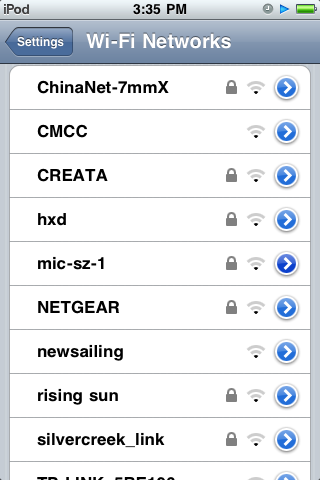
可能是“大运”的缘故,目前在深圳,已经到处可以找到好多好多的Wifi热点,包括ChinaNet的和CMCC的都已经遍地开花。 置于费用,大家看看我下面的截图自己算算就知道了。我感觉,不那么便宜呢。而且,按时间算钱,对于如我这样需要长时间在线的人,不那么适合了。

break the wall or bring the war
可能是“大运”的缘故,目前在深圳,已经到处可以找到好多好多的Wifi热点,包括ChinaNet的和CMCC的都已经遍地开花。 置于费用,大家看看我下面的截图自己算算就知道了。我感觉,不那么便宜呢。而且,按时间算钱,对于如我这样需要长时间在线的人,不那么适合了。
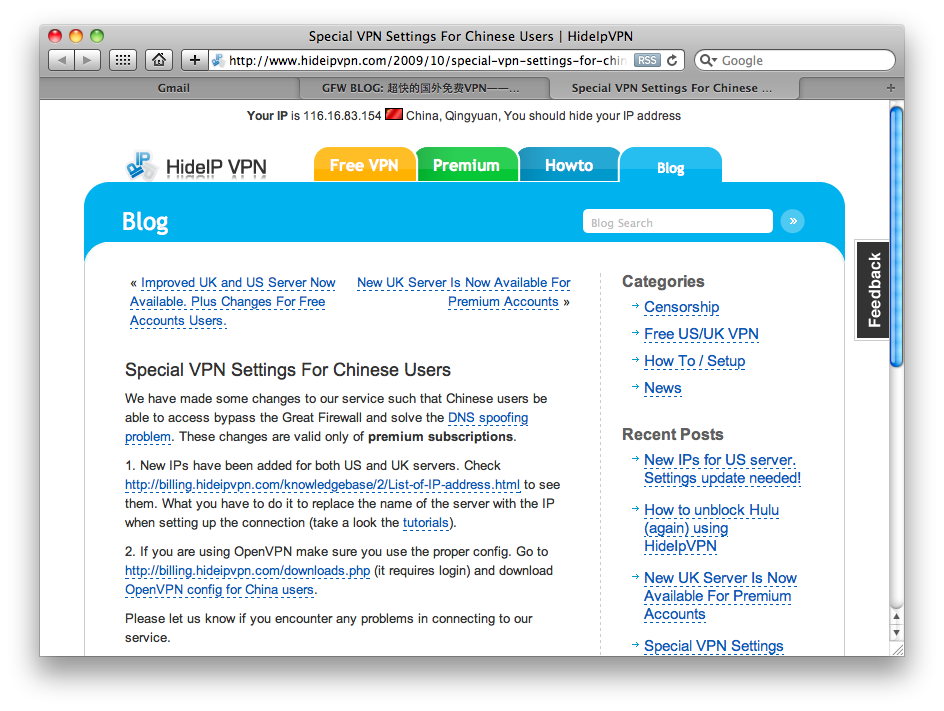
第一个图,请留意一个国外VPN网站中对中国GFW的描述,见正文第一段第二行。看来GFW已经从一个戏称变成一个比较公认的客观存在了。 第二个图,如果看不懂的,就忽略吧,看懂的朋友!赶快动手! // Update @ Dec 23 2009: 图中的Twitter IP已经失效!请注意!越来越“墙大”了!

// PS:本人于即日已从深圳回归,身体欠佳,工作繁忙,非诚勿扰。
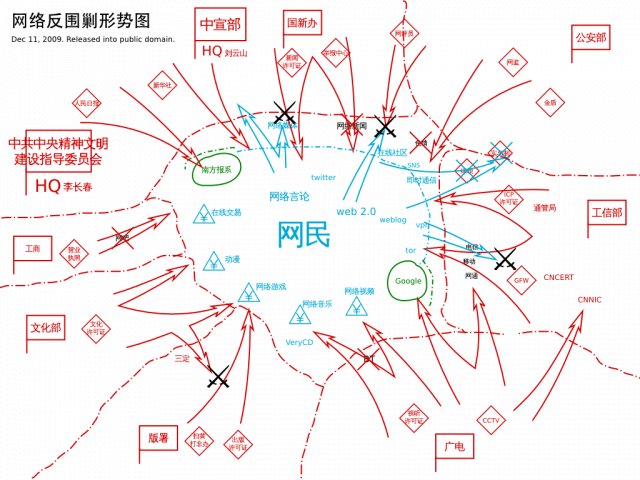
让我们铭记今天。 // PS:附图与主题无关,主题与我无关,我与世界无关,中国与互联网无关。
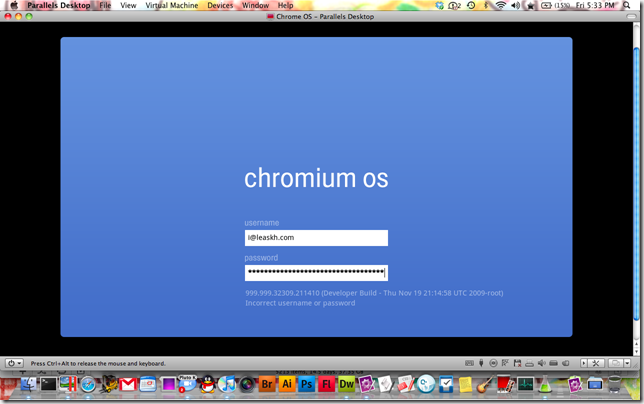
和Chrome给我的感觉一样,Chrome OS中,简洁是第一第一第一的印象,这一点很重要。 与Chrome给我的不同是,我喜欢Chrome,我需要Chrome,但是我虽然喜欢Chrome OS,却不需要Chrome OS。 就目前我的体验来说,我用Windows可以做我全部的事情,Linux也可以,基于Unix的Mac OS更加可以,但是用Chrome OS我却不可以。 就一个很简单的要求,我需要Photoshop,就目前而言(不预测未来的情况下)Web上的图像软件没有可以达到Photoshop或者Gimp的水平的。 就不再谈如何搭建各种开发环境了,那么是不是到达“云端的世界”以后开发者、设计者和最终用户会出现一次彻底的分化?是不是就要严格区分开,最终用户运行类Chrome OS的thin客户端,而开发者或者设计师等就需要更强大的fat客户端?就正如把Server OS和Desktop OS割裂开一样?如果事实是这样,那么无疑是互联网的一次实质性的倒退,如果不是的话,各种web apps能不能在Chrome OS到来之前彻底成熟到可以完全取代桌面软件的水平呢?我的意思说,就工作上,我需要的不单单是Office(或者Google Apps)就能完全胜任的。很多很多的应用,就目前而言,抛弃传统Desktop OS还是很不现实的(我很负责任地说)。 每个人都可以预测未来,但是却没有人能对未来下一个定论,每一家公司都在积极备战,在云时代来临之前准备好自己的解决方案,只是各家公司说理解的云,其实千差万别,关键是云所对客户端依赖的程度更是差异万千。理论上来说彻底的云计算(没有客户端)其实没有可能,因为浏览器就是云的一种客户端,然而现实中,Google Gears,Active X等其实正恰恰成为了云时代的障碍,因为其正在不断扩展浏览器和硬件之间的联系,然而这种联系并不在开放的HTML协议中,这将导致应用和接口的进一步私有化和垄断化,可见其实Google和Microsoft、Apple一样,并不是真心希望彻底的云的世界,而是“他们自己”的“云的世界”。其结果是从一种垄断进入另外一种垄断。我心中想的云的时代,并不是需要专门的“硬件(搭载Chrome OS的设备、搭载Mac OS X的设备等)”而是彻底的依赖一个公开的标准的协议搭建的一系列的应用所造就的云,然而任何基于这一标准的thin客户端或者fat客户端软件,都能完全完全地使用所有的功能。“不搞特殊”,才是云的将来。在这一个层面来说,Google没有必要发布Web OS,因为Chrome本来就是很优秀的浏览器,云的应用完全可以很便利地运行其中,所以Chrome OS图的并不是所谓的云计算,而是另外一种商业阴谋(从Chrome不允许自己下载安装,需要在专门的硬件上运行)就可见一斑。 我不敢说未来,虽然大家也知道云端才是未来。所以我更加不知道如何谈未来,“云”正在成为“组织数据”的中心,但是否能成为“应用”的中心这一点我还有保留,而且是否除了“云”和“本地”还会有其他的更加出乎意料的“方式”?所以,Chrome OS能否成功还有待市场的考验,只能说Chrome OS所体现的探索精神,的确很值得很多公司学习,例如所谓的“腾讯”。 // 补充:Google已经决定使用HTML5技术实现Web应用离线工作,而不是仅仅依靠Gears。[Dec 1st, 2009]
http://player.youku.com/player.php/sid/XMTMzMTM5NTcy/v.swf
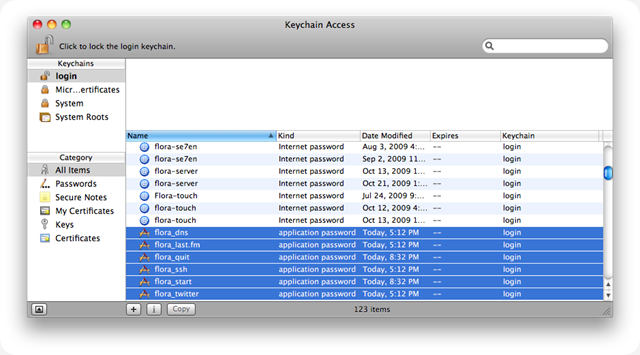
这个版本早就做好了,但是一直徘徊要不要放出来。因为这段时间我在尝试修改autossh的源代码。autossh是一个很优秀的开源项目,我希望build一个带有更完善翻墙功能的autossh版本,目前还是遇到很多问题。由于工作比较忙,可能一时三刻还完成不了,所以还是放出这个版本。这个版本对于一般的用户已经比较完美了,但是对于用Terminal比较多的用户,还是会有一点不适应的,因为脚本中连接ssh的时候会独占Terminal,这个问题我暂时还没有比较好的解决办法。 另外为了提高安全性,我尝试把各种用户名和密码保存在Mac的Keychain里面,但是不知道是不是因为Mac OS X 10.6.x中比较烦人的脚本安全规则作怪,脚本每次访问Keychain都需要弹出对话框让用户确认,所以最终还是放弃了这个做法,希望有解决办法的朋友指教一下。 好了,不多说,最后还是放出源代码(和往常一样,我将在Google Code放出封装好的app和源代码,有需要的朋友直接去下载更新吧): ( Flora_ssh-D Version 2.47 Open Source Project Home/开源项目主页:* http://code.google.com/p/flora-ssh-d/ Code by/程序编写: 黄思夏 / Leask Huang Blog: https://leaskh.com (天朝访问需翻墙) E-mail/GTalk/MSN/QQ: i@leaskh.com *) ( CUSTOM THESE SETTINGS BEFORE YOUR RUN THINS SCRIPT // 运行此脚本前请先配置此区域的参数 LEAVE IT BLANK IF YOU DON’T NEED IT // 如你不需要其中某些功能请将设置留空 ) property SSHServerName : “” property SSHUserName : “” property SSHPasswd : “” property TwitterUsername : “” property TwitterPassword : “” property DNSUsername : “” property DNSPassword : “” property LastfmUsername : “” property LastfmPassword : “” property appStList : {} property appQuitList : {} ( Example/示例 // English Help // 中文帮助 property SSHServerName : “ssh.yourdomain.com” – ssh -D Server Address (or leave it blank) // ssh -D 翻墙服务器地址 (不使用ssh -D则留空) property SSHUserName : “**” – ssh -D User Name (or leave it blank) // ssh -D 帐号 (不使用ssh -D则留空) property SSHPasswd : “**” – ssh -D Password (or leave it blank) // ssh -D 密码 (不使用ssh -D则留空) property TwitterUsername : “**” – Twitter User Name (or leave it blank) // Twitter帐号 (不使用Twitter则留空) property TwitterPassword : “**” – Twitter Password (or leave it blank) // Twitter密码 (不使用Twitter则留空) property DNSUsername : “**” – DNS User Name (or leave it blank) // DNS-O-MATIC动态IP帐号 (不使用动态IP则留空) property DNSPassword : “**” – DNS Password (or leave it blank) // DNS-O-MATIC动态IP密码 (不使用动态IP则留空) property LastfmUsername : “**” – last.fm User Name (or leave it blank) // last.fm帐号 (不使用last.fm则留空) property LastfmPassword : “**” – last.fm Password (or leave it blank) // last.fm密码 (不使用last.fm则留空) property appStList : {“App 1”, “软件2”,”iChat”} – these apps will launch while you are online (or leave it blank) // 填写【在线】时需【开启】的软件(不使用此功能则留空) property appQuitList : {“App 1”, “软件2”,”QQ”} – these apps will quit while you are offline (or leave it blank) // 填写【离线】时需【关闭】的软件(不使用此功能则留空) ) ( ======= Variable Declaration ======= ) global timeTry global DNSResponse global isOLast global iTsCurDBID global iTsORSoundVolume global strSNGArtist global strSNGName global strSNGAlbum global strSNGTrackNumber global strSNGDuration global intIdleCount ( ======= Main Script ======= ) on run set isOLast to “” set iTsCurDBID to “” set intIdleCount to 10 end run on quit with timeout of 3600 seconds if isOLast is “online” then fnTwitter(“I am offline now! // “ & (current date), true) fnShellSSHEnd(true) fnAppQuit() continue quit end timeout end quit on idle with timeout of 3600 seconds if fnCheckNet() is true then if intIdleCount > 9 then fnSSHCnt() if isOLast is not “online” then fnAppStart() fnDNSUpdate() fnTwitter(“I am online now! // “ & (current date), true) end if set intIdleCount to 0 end if fnMusic(true) set intIdleCount to intIdleCount + 1 set isOLast to “online” else fnMusic(false) if isOLast is not “offline” then fnShellSSHEnd(true) fnAppQuit() end if set isOLast to “offline” end if end timeout return 60 end idle ( ======= Functions ======= ) to fnCheckNet() try do shell script “curl –connect-timeout 30 “apple.com/favicon.ico”” if isOLast is not “online” then SmartSay({“Online”}) return true on error if isOLast is not “offline” then SmartSay({“Offline”}) return false end try end fnCheckNet to fnAppStart() if (count appStList) > 0 then SmartSay({“Start Apps”}) try repeat with intSti from 1 to (count appStList) tell application (item intSti of appStList) to activate end repeat SmartSay({“OK”}) on error SmartSay({“Failed”}) end try end if end fnAppStart to fnAppQuit() if (count appQuitList) > 0 then SmartSay({“Quit Applications” ;}) try repeat with intSti from 1 to count appQuitList tell application (item intSti of appQuitList) to quit end repeat SmartSay({“OK”}) on error SmartSay({“Failed”}) end try end if end fnAppQuit to fnSSHCnt() if (length of SSHServerName) > 0 and (length of SSHUserName) > 0 and (length of SSHPasswd) > 0 then set timeTry to 0 repeat while fnCheckSSHD() is false SmartSay({“Connect SSH D”}) if timeTry > 0 then if (button returned of (display dialog “ssh -D connection failed.” & return & “” buttons {“Retry”, “Ignore”})) is “Ignore” then exit repeat fnShellSSH() set timeTry to timeTry + 1 end repeat end if end fnSSHCnt to fnCheckSSHD() try do shell script “curl –socks5 127.0.0.1:7070 –connect-timeout 30 “apple.com/favicon.ico”” if timeTry > 0 then SmartSay({“OK”}) return true on error if timeTry > 0 then SmartSay({“Failed”}) return false end try end fnCheckSSHD to fnShellSSH() try try do shell script “killall Terminal” end try tell application “Terminal” activate fnShellSSHEnd(false) of me delay 1 do script “nohup ssh -D 7070 “ & SSHUserName & “@” & SSHServerName & “ > Downloads/.Flora_ssh-D.out” in window 1 end tell SmartSay({“SSH D connection request and log in request have been sent. Waiting for response from remote server.”}) tell application “Terminal” do script SSHPasswd in window 1 delay 1 quit end tell end try end fnShellSSH to fnShellSSHEnd(isSay) if (length of SSHServerName) > 0 and (length of SSHUserName) > 0 and (length of SSHPasswd) > 0 then if isSay is true then SmartSay({“Disconnect SSH D”}) try do shell script “killall ssh” do shell script “killall ssh-agent” do shell script “rm ~/Downloads/.Flora_ssh-D.out” end try end if end fnShellSSHEnd to fnTwitter(strTwText, isSay) if (length of TwitterUsername) > 0 and (length of TwitterPassword) > 0 and (length of strTwText) > 0 then if (length of strTwText) > 140 then set strTwText to (characters 1 through 137 of strTwText as string) & “…” end if if isSay is true then SmartSay({“Update Twitter state”}) try do shell script “curl –connect-timeout 30 –user “ & (quoted form of (TwitterUsername & “:” & TwitterPassword)) & “ –data-binary “ & (quoted form of (“status=” & strTwText)) & “ “https://twitter.com/statuses/update.json”“ if isSay is true then SmartSay({“OK”}) on error if isSay is true then SmartSay({“Failed”}) else SmartSay({“Update Twitter state failed”}) end if end try end if end fnTwitter to fnDNSShell() try set DNSResponse to (do shell script “curl –connect-timeout 30 “https://” & DNSUsername & “:” & DNSPassword & “@updates.dnsomatic.com/nic/update?&wildcard=NOCHG&mx=NOCHG&backmx=NOCHG””) if first word of DNSResponse is “good” then – (second word of DNSResponse) is IP address return true else return false end if on error return false end try end fnDNSShell to fnDNSUpdate() if (length of DNSUsername) > 0 and (length of DNSPassword) > 0 then SmartSay({“Update dynamic IP”}) if fnDNSShell() is true then SmartSay({“OK”}) else SmartSay({“Failed”}) end if end if end fnDNSUpdate to fnURLec(strToUEC) return do shell script “python -c ‘import sys, urllib; print urllib.quote(sys.argv[1])’ “” & strToUEC & “”” end fnURLec to fniTunesisActive() tell application “System Events” to return (name of processes contains “iTunes”) end fniTunesisActive to fuisiTunesNUD() if fniTunesisActive() is true then tell application “iTunes” if player state is playing then set iTsNewDBID to (get database ID of current track) if iTsNewDBID is not iTsCurDBID then set strSNGArtist to (get artist of current track) set strSNGName to (get name of current track) set strSNGAlbum to (get album of current track) set strSNGTrackNumber to (get track number of current track) set strSNGDuration to (get duration of current track as integer) set iTsCurDBID to iTsNewDBID return true else return false end if else return false end if end tell else return false end if end fuisiTunesNUD to SmartSay(strToSay) set isiTPing to false if fniTunesisActive() is true then tell application “iTunes” to if player state is playing then set isiTPing to true end if if isiTPing is true then tell application “iTunes” set iTsORSoundVolume to sound volume set timeTry to 0 repeat while timeTry < 10 set timeTry to timeTry + 1 set sound volume to iTsORSoundVolume * (15 - timeTry) / 15 delay 0.1 end repeat end tell repeat with intSti from 1 to (count strToSay) say “” & (item intSti of strToSay) if intSti < (count strToSay) then delay 1 end repeat tell application “iTunes” set timeTry to 10 repeat while timeTry > 0 set timeTry to timeTry - 1 set sound volume to iTsORSoundVolume * (15 - timeTry) / 15 delay 0.1 end repeat end tell else say “” & strToSay end if end SmartSay to fnMusic(isOnline) if fuisiTunesNUD() is true then SmartSay({strSNGName, strSNGArtist}) if isOnline is true then if (length of LastfmUsername) > 0 and (length of LastfmPassword) > 0 then try do shell script “curl –connect-timeout 30 “http://lastfmstats.livefrombmore.com/universalscrobbler/scrobble.php?submissionType=track” & “&username=” & LastfmUsername & “&password=” & LastfmPassword & “&artist=” & fnURLec(strSNGArtist) & “&track=” & fnURLec(strSNGName) & “&album=” & fnURLec(strSNGAlbum) & “&number=” & strSNGTrackNumber & “&duration=” & strSNGDuration & “”” on error SmartSay({“Scrobbling Failed”}) end try fnTwitter(“I am listening to #” & strSNGName & “ by #” & strSNGArtist & “ in album #” & strSNGAlbum & “. // “ & (current date), false) end if end if end if end fnMusic

这个海报是上个周末画的,随手弄一下而已,不怎么好,由于是母校的活动,贴上来分享一下。 大家见笑了。 // 由于种种原因,这个版本的海报没有最终用上。 // 真怀念以前“音协”的日子。找个时间再把得意作品贴上来。
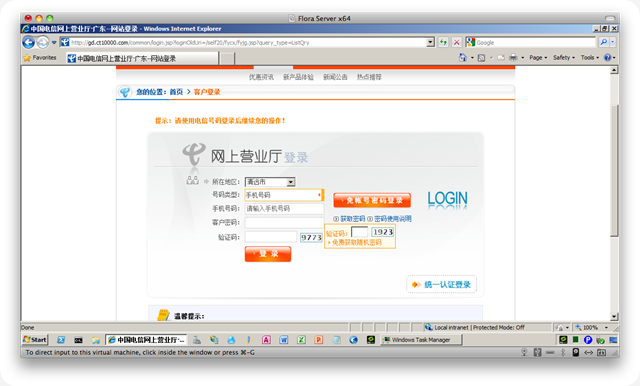
周末,朋友的天翼189电话疑似被乱扣费,要我帮她上网查询一下通话记录,于是我又一次登录中国电信的网上营业厅,又一次被震撼。 很难想象国内的3G能带来什么优秀的用户体验,我再一次被中国电信的Web设计师的设计能力所震撼(我的Blog中有上一次被震撼的经历,大家可以自行Google)。 登录你会发现有两个验证码?这是我见过的“最安全”的站点,中国电信!“好样的”!不过有趣的是填着填着,其中一个验证码框框就消失了,好神奇呀!换用各个浏览器,效果都是如此,这回长见识了: 其次,不支持Safari、Firefox!!如果你使用非IE浏览器调用话费查询的功能,你根本无法找到开始查询的按钮,换用IE,按钮就出来了,IE真“强大”。如下图,非IE浏览器下账单显示的地方变成了“温馨提示”,好神奇呀!电信想告诉我:“黄先生,您的话费是人民币 温馨提示.00 元整!”: 好了,迫不得已又换用IE登录,这回更厉害了!我一不小心,把“手机号码”写错了,程序提示我“手机号码错误”,然后我更正。又一不小心,把密码填错了,程序提示我“密码错误”。神奇的事情开始了,我按一下“OK”,提示“手机号码”错误,再按一下“OK”,提示“密码错误”,我不停按,不停交替显示两个错误。然而这个对话框并没有“Cancel”的按钮。我一直按,按了不下30次,反复出现两个错误。我彻底死心了,整个IE被这个死循环卡住了,最终我只能强制退出IE了。 朋友们,不要说我偏激,当一切都在吹嘘“与世界接轨”的时候我们不妨想想,如此的Web交互水平,比好多国内的网站都不不上,不要说什么Google、Apple!!什么的了,到时候老外来了,带着各种各样的设备(浏览器千差万别)以及勉强可交流的汉语,如何使用你如此“高级”的服务呀!?我相信国内不是没有“牛人”,错了,不是没有“智力正常”的人,为什么如此神奇的设计可以出现在我们伟大的“国家电信公司”里面!?估计是某人的“废物子弟”通过不知哪个狗洞钻进去了吧。 失望,苦恼。为什么我要说那个不知名的设计师智障呢?因为我的智商本来就很低了,我觉得既然连我这么笨的人都可以做好的事情,那这个做不好事儿的可怜虫只能算是个智障的孩子了。不开放竞争式的人才制度,谈什么与国际接轨!?根本就是放屁。不单单电信产业这样,悲哀的是国有企业几乎都如此。 我还有大量类似的例子,有时间再一一分享给大家。 如果真有某人看了觉得被冒犯,敬请原谅,就事而论,想得到别人的尊重,请先把事情做好。

程序员通常会遇到需要计算的时候,然而并不单单是加减乘除,我们需要带有表达式支持的计算功能。我想在*nix上没有比bc更加便利的了,但是bc有一点让我很压抑的就是bc的小数处理需要在每次进入bc的时候设置,十分不友好。于是就萌生了用shell脚本封装一下bc的想法。于是我封装出一个计算器[C]alculator。 设计师常常有截取网页全图的需要,于是我曾撰文《在Mac上通过Terminal截取网页全图 / Full Page Screenshots by Terminal On a Mac》(URL:http://honeonet.spaces.live.com/blog/cns!15BAC1A170471DB!15092.entry)提出通过webkit2png截取网页全图的方法。但是webkit2png使用也并不太便利:默认情况下每次使用都要求输入webkit2png脚本所在的位置,默认参数会输出3个尺寸的图片,默认参数下图片会存储在shell当前的工作目录(并不人性化),默认情况下不能识别“www.yourdomain.com”或者“yourdomain.net”这样的地址(webkit2png要求输入完整的,如“http://www.yourdomain.com”这样的地址),默认情况下webkit2png生成的文件名也不符合Mac上截图热键生成的带有时间信息的文件名的习惯!!有没有办法让webkit2png更加聪明好用呢?于是我又把webkit2png封装了一下,得到一个Web Pages [C]atcher。 昨晚突发奇想,把两个类似的脚本整合一下: [C]alculator * Web Pages [C]atcher = c * c = c ^2 于是我把我的脚本命名为Flora c^2,主要是应付我的工作要求,顺便写出来分享给大家,希望也能为大家的工作提高一点点效率。 脚本需要你先下载好webkit2png,方法见我上面提到的文章,然后在脚本中注释掉以下这行,如: # bitmapdata.representationUsingType_properties_(AppKit.NSPNGFileType,None).writeToFile_atomically_(filename + “-full.png”,objc.YES) 【去掉】 添加下面一行: bitmapdata.representationUsingType_properties_(AppKit.NSPNGFileType,None).writeToFile_atomically_(filename + “.png”,objc.YES) 【添加】 然后保存我下面的代码为shellscript,然后和webkit2png放在同一个文件夹,设置好文件夹和脚本的权限都是允许执行的,如果不和你的程序名称冲突,建议把文件名存为“c”(就一个小写c就好了,便于执行)。 // 注意了,别忘记你可能还需要把你的脚本文件夹添加到$PATH环境变量中! 代码如下: *#!/bin/bash ################################################# Flora c^2 0.7 ################################################# What’s c^2? c^2 for [C]alculator & Web Pages [C]atcher Code by LeaskH.com November 7, 2009 #################################################* header () { echo “Flora c^2 0.7 by LeaskH.com // based on bc 1.06 & webkit2png 0.5”; echo “”; } fnwebkit2png() { python “$(dirname “$0”)”/webkit2png -W 1024 -H 768 -F -o “Web shot date "+%Y-%m-%d at %H.%M.%S %p"” -D “~/Downloads” $1; echo “”; } fnbcexec() { echo “scale=7; $1” | bc; echo “”; } calexec() { while true; do if [ -n “$strfloratc” ]; then if [ “$strfloratc” != “” ] && [ “$strfloratc” = “h” ]; then echo “Options include:”; echo “ h - This help file”; echo “ hb - bc help file”; echo “ hw - webkit2png help file”; echo “ c - Clears the screen”; echo “ q - Quits the program”; echo “”; strfloratc=””; fi if [ “$strfloratc” != “” ] && [ “$strfloratc” = “hb” ]; then bc -h; strfloratc=””; fi if [ “$strfloratc” != “” ] && [ “$strfloratc” = “hw” ]; then fnwebkit2png –help; strfloratc=””; fi if [ “$strfloratc” != “” ] && [ “$strfloratc” = “q” ]; then exit; fi if [ “$strfloratc” != “” ] && [ “$strfloratc” = “c” ]; then clear; header; strfloratc=””; fi if [ “$strfloratc” != “” ] && [ “${strfloratc:0:4}” = “http” ]; then fnwebkit2png $strfloratc; strfloratc=””; fi if [ “$strfloratc” != “” ] && ([ “${strfloratc:0:3}” = “www” ] || [ “${strfloratc:0:3}” = “wap” ]); then fnwebkit2png http://$strfloratc; strfloratc=””; fi if [ “$strfloratc” != “” ] && ([ “${strfloratc:(-3):3}” = “com” ] || [ “${strfloratc:(-3):3}” = “net” ]); then fnwebkit2png http://$strfloratc; strfloratc=””; fi if [ “$strfloratc” != “” ]; then fnbcexec $strfloratc; strfloratc=””; fi fi if [ $1 = true ]; then read -p “” strfloratc; calexec true $strfloratc; else exit; fi done } header; strfloratc=$1; if [ -n “$1” ]; then calexec false; else calexec true; fi exit 0; ok,就那么简单。 下面看看执行效果: 上图演示内容: 通过 c + [空格] + [表达式] 直接计算; 通过 c + [空格] + [网址] 截取网页全图; 通过 c 启动程序,程序启动后,输入表达式直接计算,输入网址自动截取; 查看Downloads文件夹,三张网页截图已经安静地呆在里面了。 文件名的设定我按照Mac的习惯设置,Mac上的图片截取文件名为:“Screen shot 2009-11-06 at 12.25.15 PM.png”,于是我设定的截图文件名为:“Web shot 2009-11-08 at 17.17.46 PM.png”。 截图文件保存在~/Downloads文件夹。通过h命令查看程序帮